
You do not need to memorise where every command lives. Search for it by name, or look up its shortcut.
Shortcuts in this help are written with Windows keys. On a Mac, press Cmd where it says Ctrl and Option where it says Alt; the app's menus and shortcut list show the Mac keys.
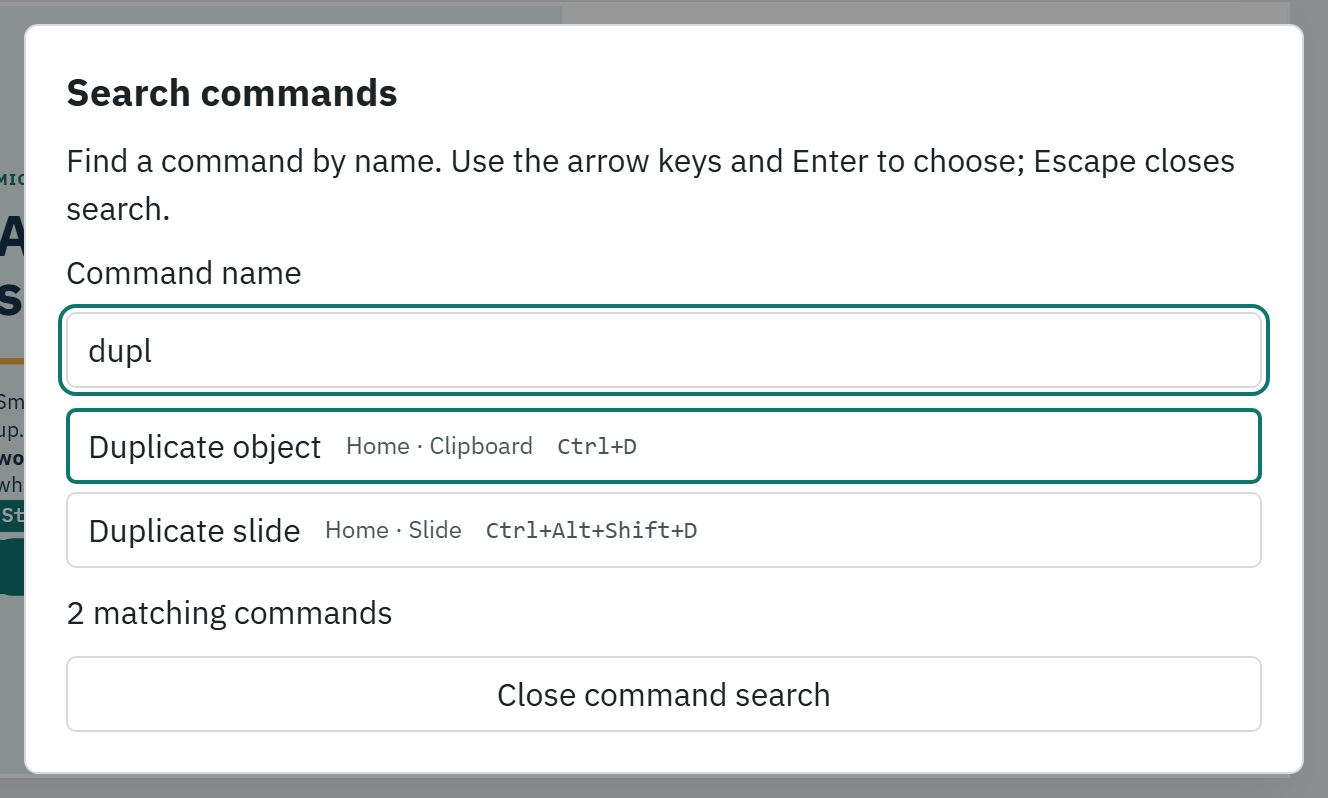
Search for a command
- #
Press Alt+Q, or choose Help › Search commands.
- #
Type part of the name, such as align or duplicate. Each result shows which ribbon tab and group it belongs to.
- #
Use the arrow keys to pick one and press Enter. Press Escape to close the search.
A command that cannot run right now stays in the list with a short reason, such as Select a text object on the slide first.
See every shortcut
- #
Press ? while you are not typing in a text field, or choose Help › Keyboard shortcuts….
- #
Read the list, then close it with Escape.
The shortcuts you will use most
| Shortcut | What it does |
|---|---|
| Ctrl+S | Save |
| Ctrl+Z / Ctrl+Y | Undo / Redo |
| Ctrl+Alt+Z | Undo the assistant's last change |
| Ctrl+M | New slide (title and text) |
| Ctrl+D | Duplicate the selected object |
| Ctrl+F or Ctrl+H | Find and replace (Home › Editing › Find… and Replace…) |
| Ctrl+Shift+P | Publish |
| Alt+Up / Alt+Down | Move the selected slide up or down |
| Alt+Q | Search commands |
| Ctrl+K | Insert a hyperlink (Insert › Hyperlink), or link the selected words while you edit text |
| Shift+F10 | Open the right-click menu for what is selected |
| Ctrl+G / Ctrl+Shift+G | Group / Ungroup |
Tip: More commands, at the right of the ribbon tab row, lists every command in named groups (History, Selection, Objects and the ribbon tabs), with each shortcut beside its name.
Still stuck?
Write to support@xogogy.com. A person at GForce Learning reads every message. Include the app version from Help › About Xogogy.